
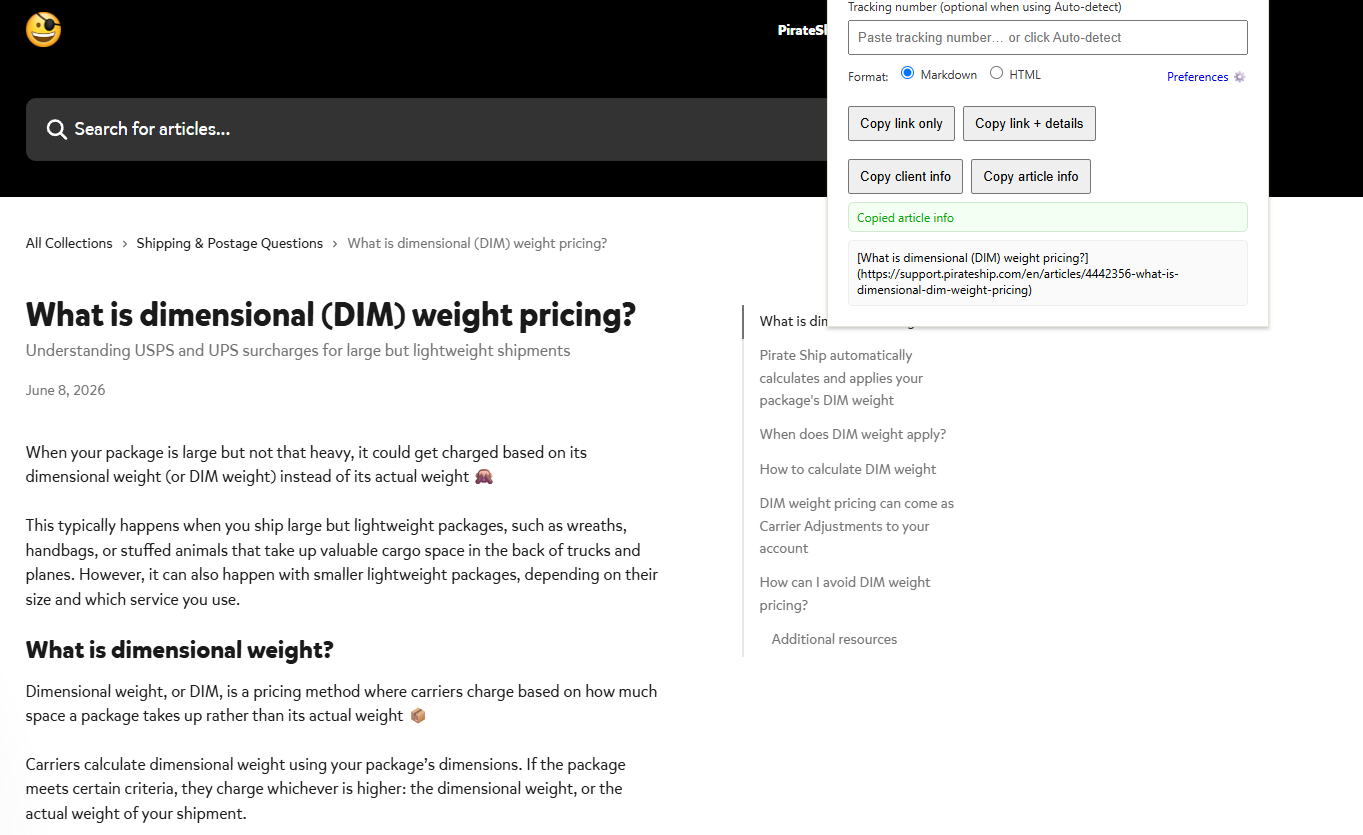
Support article capture
ChartFinder copies a support article into a reusable reference for a support reply.

Chrome extension for cleaner support context capture
A local Chrome extension that copies visible shipment, client, and support article context into a clean format for support replies.
The tool addressed a queue problem: teammates needed clean context quickly and a data model they could explain and review.
ChartFinder reads the context already on screen, formats it for a support reply, and keeps the process local and reviewable.
Current page
Support context
Output
Markdown or HTML for support replies.
Data boundary
Visible page text, clipboard, local preferences.
Review reminder
Double-check copied details before sending.
Public-safe mockup showing the extraction and clipboard pattern.
A public-safe view of ChartFinder copying article context into a clean reference.
ChartFinder copies a support article into a reusable reference for a support reply.
The extension reads visible browser content, copies output to the clipboard, and stores preferences locally.
Chrome extension
JavaScript + HTML/CSS
Markdown / HTML
Chrome local storage
Support teammates repeatedly copied tracking numbers, shipment pages, service details, client links, and article references. Each step was small, but the repeated work slowed the queue.
The extension handled support context, so its data model had to be easy to explain. It read visible page text, ran in Chrome, made no backend queries, sent no data externally, and stored preferences locally.
A support rep could open a shipment, client page, or article, then copy the relevant context as Markdown or HTML. The output stayed visible and editable before use.
ChartFinder grew from a copy helper into a documented workflow with setup steps, troubleshooting, known issues, compliance notes, feedback, and a changelog.
The extension handles shipment details, client context, and article links on pages teammates already use.
Extracted visible shipment context like recipient, service, insurance, tracking number, cost, and related shipment page links.
Copied client context into a cleaner format, including a linked client name and available email context for support handoffs.
Copied support article or internal resource context into a reusable reference format, including an internal-only reminder when needed.
The workflow stays in the browser and avoids another destination.
Start from an authenticated support page, client page, support article, or internal resource already visible in the browser.
Read the information available on the current page, without backend account access or external data calls.
Format the selected context as Markdown or HTML, then copy it to the clipboard.
The support teammate reviews the copied output before using it in a customer or internal message.
The guide separates visible text, clipboard output, local preferences, and external transmission.
ChartFinder worked from the current page surface. It did not search customer accounts or reach into backend systems.
The extension ran inside Chrome, with copied output going to the local clipboard and preferences stored in Chrome local storage.
The documented data flow avoided API calls and external communication, which made the tool easier to explain and review.
The guide told users to double-check copied output, especially around known parsing edge cases like service or insured-value detection.
The guide covers setup, use cases, troubleshooting, known issues, compliance notes, feedback, and changes.
Walked teammates through Chrome extension setup, developer mode, extension loading, pinning, and update flow.
Explained shipment lookup, client information copy, article copy, auto-detect behavior, and output format choices.
Explained common messages about refreshes, missing details, empty copies, and HTML formatting, with a next step for each.
Documented cases where service or insured-value detection still needs review.
Updates improved reliability, support formatting, and preference controls.
Improved long-lived tab support, added clear success feedback, and shortened ping timeouts without changing the local data model.
Added autorun, shipment detection, and Markdown output for faster support replies.
Added preferences for output and behavior.
Outlined a broader support toolkit while keeping the current tool focused.
The work combines frontline support, browser automation, privacy-aware design, and adoption documentation.
Copy-and-paste work can look too minor to fix. In a busy queue, repetition makes it worth addressing.
The model is simple to explain: visible text in, formatted clipboard output out, preferences stored locally.
Setup, troubleshooting, compliance notes, feedback, and a changelog made the tool usable beyond its first release.
ChartFinder reduced a repeated queue task with a local, reviewable, documented browser tool.